Know your money. Know your next step.
Brokerage Guide
Understand the inputs and cash movements behind your investment-account projection.
1. Review the account and inputs
Open Brokerage and confirm the account shown at the top of the screen. Open Inputs and review the starting balance and the contribution, withdrawal and return assumptions available there. Follow the units and periods shown in each field.
Keep a note of which funds this projection represents. Do not add it to a retirement projection if both models describe the same money.
2. Read the projection
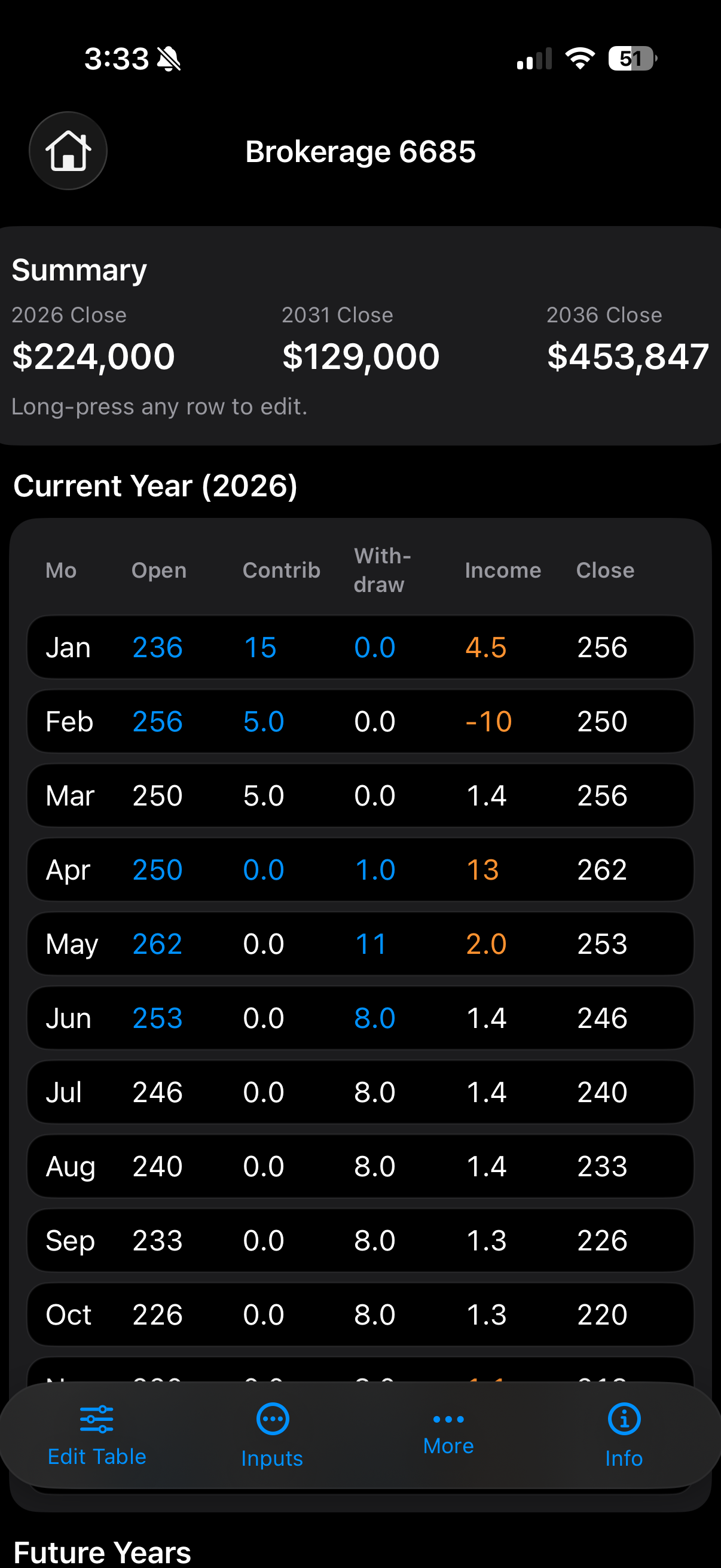
The summary shows projected closing balances for selected years. In the monthly table, review Open, Contrib, Withdraw, Income and Close together to understand the movement from starting to ending balance. Check the display scale before comparing a table value with the summary.
Contributions add funds and withdrawals remove them. The projected income and closing balance follow the model’s assumptions; they are not promised returns.
3. Inspect and edit a period
Use Edit Table, or long-press a row as indicated on the screen, to inspect the available edits. Check the selected period and field before saving. Review the resulting close and following periods after a change.
To understand a change, record the original inputs and result, change one factor, then compare the same dates. This is a manual comparison using Brokerage inputs and table edits.
4. Check an unexpected result
- Confirm the account, starting balance, dates and displayed units.
- Review contributions, withdrawals and return assumptions for the affected period.
- Check any table edits that may differ from the baseline inputs.
- Avoid assuming that movements in another calculator automatically appear here. Check the entries in each model.